Your team's passwords
belong in Salesforce.
Not in Slack, sticky notes,
or a tool nobody fully controls.
Secret Keybox is a password manager built natively on Salesforce. No external systems, no data leaving the platform — credentials stay inside your org, encrypted, and fully under your control.
Free 14-day trial · No credit card · Installs in 5 minutes · Salesforce Security Review passed
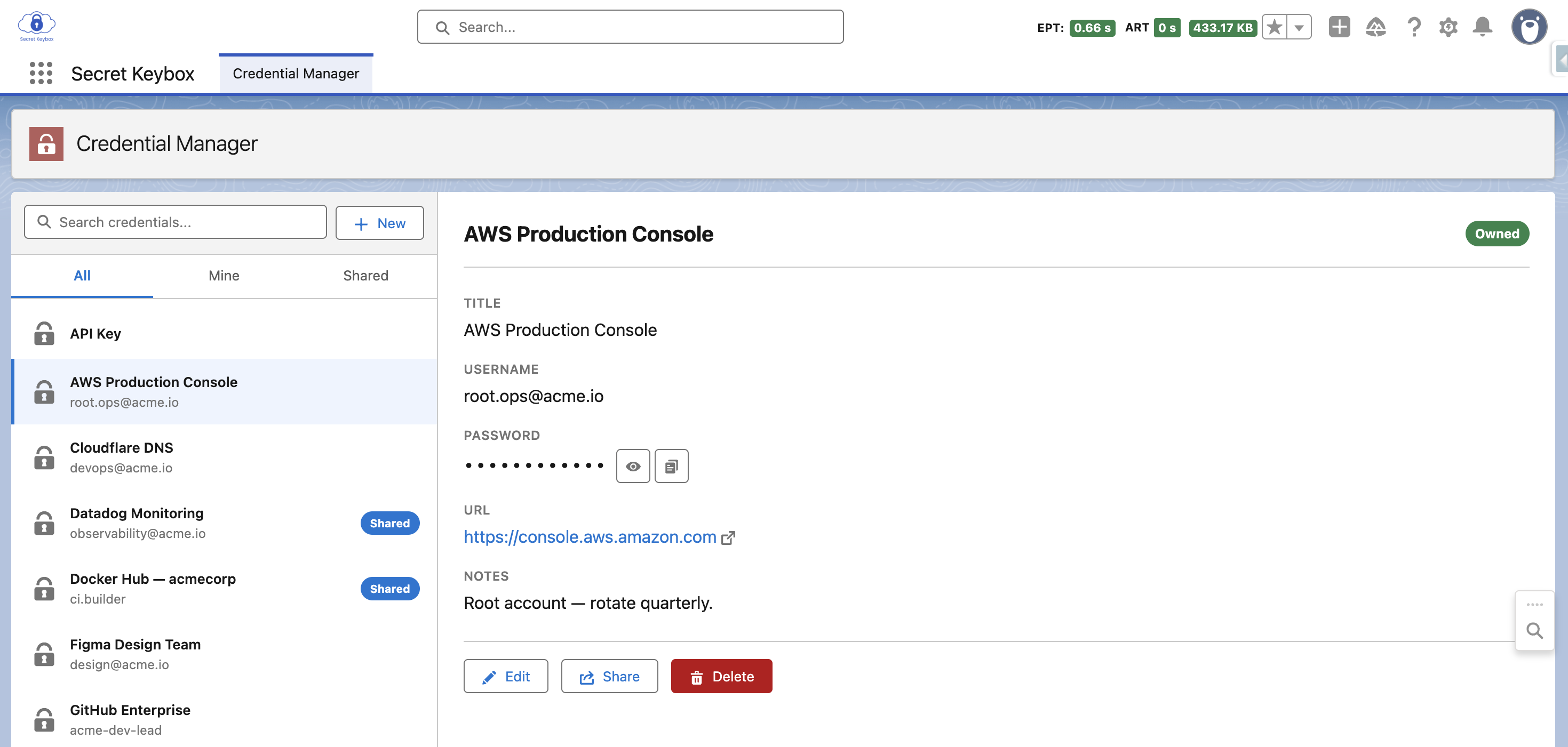
- Encrypted — even admins can't read values
- Unlimited users
- Native Salesforce — data never leaves the platform
- Fully customer-controlled
- Passed Salesforce Security Review
Sound familiar?
These aren't edge cases. They're the daily reality for teams running Salesforce without proper credential management.
“Does anyone have the login for that sandbox?”
Passwords shared over Slack and Chatter end up in audit logs, backups, and inboxes of everyone in the channel. That's not a storage strategy.
Passwords in Text fields on Accounts.
Plain text. Visible in data exports, audit trail, reports. Anyone with the right permission set can see — and export — every credential your team has stored this way.
Someone quits and takes the passwords with them.
If credentials lived in their personal 1Password — or their head — you don't know what they had access to. Offboarding means nothing if you can't revoke what you can't see.
This isn't a people problem. It's a tooling problem.
A password manager that lives where your team works.
No integrations. No external vaults. No third-party tools to trust. Secret Keybox runs entirely inside your Salesforce org — encrypted, controlled by you, accessible only to people you explicitly authorize.
Data never leaves your Salesforce org
Every credential is stored encrypted inside your Salesforce organization — the same platform your team already uses every day. No external servers, no third-party vaults, no data in transit to somewhere you don't control. Your org, your data, your rules. Even system administrators cannot read the encrypted values.
Encrypted Storage
Credentials stored encrypted — never as plain text. Values are not visible in data exports, reports, or audit trail. The encrypted value is unreadable without the key, including by system administrators.
Explicit Sharing Only
Share a credential with a specific user or a group. Set the access level. Revoke with one click. Nothing is accessible unless you deliberately shared it.
You Control Who Sees What
Every credential is private by default. Share explicitly with individuals or groups, set access levels, and revoke instantly. No credential is accessible unless you deliberately granted it.
Mask & Copy
Reveal or copy a password with one click. Auto-hidden after a configurable timeout.
Sharing Groups
Create groups like “DevOps” or “Sales” and manage access for entire teams at once.
Ownership Transfer
Hand off a credential during offboarding — history intact, password unchanged. No knowledge walks out the door.
Audit & Visibility
See exactly who has access to which credentials. Full visibility in one place — no spreadsheets needed.
No AppExchange Required
Install directly into your org via a deployment package. No marketplace approval, no waiting.
Managed Package
Full IP protection — customers cannot view or modify the Apex code. Updates pushed centrally, no re-installs needed.
Not even I can read your secrets.
Not a policy. Not a promise. It's how the encryption is built. Here's the whole mechanism — no hand-waving.
You save a secret
The value is encrypted with AES-256 before it's ever written to the database. What lands in Salesforce is ciphertext — never plain text.
The key never leaves your org
The encryption key is generated inside your Salesforce org and derived per owner. It lives only there — it's never sent to me, and there is no copy anywhere outside your org.
No master key, no back door
There is no master key. I can't read, export, decrypt, or recover your secrets — and neither can your own admins browsing the records. The plaintext only appears when an authorized user reveals it in the app.
The trade-off, stated plainly
Because the key is yours alone, you are responsible for your org and its backups — if the key or your Salesforce data is lost, the affected secrets are gone for good, including for me. That's the honest cost of a design where no third party can ever reach your credentials. I think it's the right one for a password manager. Read the full security FAQ →
Why not just… the way you do it now?
Every alternative solves one thing and breaks another. Secret Keybox is the only option that stays native, encrypted, and under your control at the same time.
| Slack / Chatter | Text fields on records | Password manager (outside Salesforce) |
Secret Keybox | |
|---|---|---|---|---|
| Data stays inside Salesforce | Yes | Yes | No | Yes |
| Encrypted, not plain text | No | No | Yes | Yes |
| Hidden from admins & data exports | No | No | Yes | Yes |
| Access survives offboarding | No | Yes | No | Yes |
| Per-user & per-group sharing you control | No | No | Partial | Yes |
| No extra vendor to trust with your logins | Yes | Yes | No | Yes |
The convenient options aren't secure. The secure options aren't native. Secret Keybox is both.
Built for teams running Salesforce.
Anyone who logs into systems, manages integrations, or shares access with teammates inside Salesforce.
Salesforce Admins
You know the pain. Sandbox passwords over Slack, API keys in Notes, credentials disappearing when someone quits. This is the tool you've been looking for.
CTOs & Heads of IT
Your sales manager shouldn't have access to their reps' personal credentials — even if Salesforce technically allows it. Secret Keybox enforces that boundary at the architecture level, not just by policy.
Compliance Officers
Privacy by design — role hierarchy not applicable to personal credentials. GDPR-relevant boundary enforced architecturally, not through policy and hope.
Salesforce Security Review: Passed ✓
Secret Keybox has passed the Salesforce AppExchange Security Review — the same in-depth audit every AppExchange app must clear. The AppExchange listing is now in preparation. Until it goes live, the direct install link below remains the official way to get Secret Keybox — same package, same product.
Audited by Salesforce
Architecture, encryption, and data handling reviewed and approved by the Salesforce security team.
Free 14-Day Trial
Try the full product risk-free. Cancel anytime before day 14 — no charge, no commitment.
Seamless Transition
When the AppExchange listing goes live, your install upgrades automatically. No re-installation, no data migration.
Security Review passed. AppExchange listing in preparation.
Install it straight into your org.
Secret Keybox installs like any Salesforce package — directly from a link, no credit card. The package has passed the Salesforce Security Review; until the AppExchange listing goes live, this link is the official install path. You get a full 14-day trial the moment it's installed. Install in a sandbox first if you'd like to try it safely.
1 · Install the package
Pick the org you want to try it in. The installer walks you through it — about 2 minutes. I recommend a sandbox for your first look.
Get the steps + trial reminders
Leave your email and I'll send the install guide and a heads-up before your 14-day trial ends — so it never lapses on you by surprise.
2 · Turn it on (5 minutes)
Run the install link
Choose Install for Admins (or All Users) and confirm. The package sets itself up automatically.
Assign permission sets
Setup → Permission Sets. Give Secret Keybox — Basic Access to users, and Admin Access to admins.
Open the app
App Launcher → Secret Keybox. Start adding and sharing credentials right away.
Confirm it's healthy
Admins: the SKB Admin tab shows a green health check — encryption key and background jobs are ready.
Heads up: don't let your trial lapse silently
If you install without leaving your email, I have no way to remind you when the 14-day trial is ending. When a trial expires, Salesforce suspends the package — the Secret Keybox app simply disappears from your App Launcher, with no in-app warning.
If the app vanishes, that's what happened. To check: Setup → Installed Packages — if Secret Keybox shows Suspended, your trial ended.
Your data is safe. Every credential stays encrypted in your org, untouched. Subscribe and access is restored instantly — everything exactly where you left it.
Built from real frustration.
By someone inside the Salesforce ecosystem.
Secret Keybox was born after years of working with Salesforce orgs where credentials lived everywhere except under control — sent over Slack, pasted into Notes, lost when someone quit.
Every existing solution either doesn't understand Salesforce, or inherits its broken sharing model. I built the tool I kept looking for.
Native. Secure. Intentionally different from how Salesforce handles sharing by default.
Simple pricing. No user limits. No surprises.
One license covers your entire org — whether you have 5 users or 5,000.
VAT included · Billed monthly · Cancel anytime
- ✓ Unlimited users
- ✓ Data stays inside Salesforce
- ✓ Encrypted credential storage
- ✓ User-level and group sharing
- ✓ Install without AppExchange
- ✓ Email support
VAT included · One payment · €42/mo equivalent
- ✓ Unlimited users
- ✓ Data stays inside Salesforce
- ✓ Encrypted credential storage
- ✓ User-level and group sharing
- ✓ Install without AppExchange
- ✓ Email support
Nonprofit or NGO? It's free.
I believe organizations doing good shouldn't pay for keeping their credentials safe. Registered nonprofits get Secret Keybox completely free — just reach out and I'll set you up.
Get a free NGO license →Trial first, pay later: install free, no card. After 14 days pick monthly or annual — invoiced to your company.
Your credentials deserve a better home than a spreadsheet.
Every day without proper credential control is a day of unmanaged risk — passwords over Slack, plain text fields, and tools outside your platform that you can't fully control.
Install Secret Keybox once. Everything stays in Salesforce, encrypted, and under your control. Permanently.
Have questions? Reach me at contact@secretkeybox.com